

The top GoFormz alternatives for field-service teams in 2026 are Appenate, Jotform, Smartsheet, GoCanvas, TrueContext,doForms, and Fluix. Each solves a different piece of the mobile data-collection puzzle, and picking the wrong one costs more than the subscription fee; it costs retraining time, integration rework, and field crew frustration.
Here is the quick picture before we go deeper:
- Offline-first enterprise teams should prioritize Appenate and ProntoForm, as they run native offline apps that cache data locally and sync on reconnect, which is crucial when your crews work in basements, rural sites, or other areas with spotty coverage.
- Fast migration from paper favors Appenate (AI-assisted instant form generation) or GoCanvas (quick-start templates).
- Budget-conscious or smaller teams will find Jotform’s free tier and Smartsheet’s familiar grid interface the lowest-friction starting points.
| Platform | Best for | Native mobile/offline |
|---|---|---|
| Appenate | Enterprise field ops, white-label | iOS, Android, Windows |
| Jotform | General forms, small teams | iOS, Android (limited offline) |
| Smartsheet | Project-centric workflows | iOS, Android |
| GoCanvas | Fast paper-to-digital migration | iOS, Android |
| TrueContext | Regulated field workflows | iOS, Android |
| doForms | Mid-market field data | iOS, Android |
| Fluix | Document-heavy field teams | iOS, Android |
How do these GoFormz alternatives compare across key buying criteria?
Product directories consistently group mobile form platforms into three categories: native mobile-first field platforms, no-code workflow engines, and web survey builders with a mobile app bolted on. That distinction matters more than any feature checklist, because browser-based tools risk data loss in intermittent networks while native apps cache inputs locally and resolve conflicts on sync.
| Platform | Starting price/trial | Offline support | Workflows & logic | Salesforce / Power BI | Data export | SOC2 / HIPAA | Support model |
|---|---|---|---|---|---|---|---|
| Appenate | Free trial; varies by plan | Native (iOS/Android/Windows) | Yes, AI-assisted | Both native | CSV, PDF, API | SOC2 | Self-serve + managed |
| Jotform | Free tier; paid from ~$34/mo | Limited offline | Conditional logic | Via Zapier | CSV, PDF, Excel | HIPAA (paid) | Self-serve |
| Smartsheet | Free trial; from ~$9/user/mo | Limited offline | Automation rules | Native Salesforce | CSV, Excel, PDF | SOC2, HIPAA | Self-serve + support |
| GoCanvas | Free trial; varies by plan | Native iOS/Android | Conditional logic | Salesforce | CSV, PDF | SOC2 | Self-serve |
| TrueContext | Varies by plan | Native iOS/Android | Advanced workflows | Salesforce, SAP, Power BI | CSV, PDF, XML | SOC2, HIPAA | Managed |
| doForms | Varies by plan | Native iOS/Android | Conditional logic | Salesforce, QuickBooks | CSV, PDF | SOC2 | Self-serve |
| Fluix | Varies by plan | Native iOS | Workflow routing | Salesforce, SharePoint | PDF, CSV | SOC2 | Self-serve + managed |
Stat callout: Enterprise buyers consistently rank Salesforce and Power BI integration as the top differentiators when evaluating field-service platforms, ahead of price and even ease of setup.
Platforms offering bidirectional sync with enterprise systems deliver far more operational value than tools that only push CSVs to a portal. If your team already runs Salesforce or Power BI, that native connector is worth more than a lower monthly rate.
Per-platform profiles: which alternative fits your team?
Appenate
Appenate is a no-code platform built for enterprise field operations, running fully native apps on iOS, Android, and Windows. Its AI-assisted instant form generation significantly reduces setup time, and it covers every device feature field crews rely on: GPS tagging, photo capture, e-signatures, NFC, and barcode scanning. White-label and reseller licensing make it the go-to for IT consultants and software vendors who need to deploy branded field apps at scale.
A free trial is available. All standard plans require a minimum of 5 users, while enterprise options vary based on scale. Pricing starts at $20 per user, per month (when billed annually) or $25 per user, per month (when billed monthly).
Jotform
Jotform is a web-first form builder with a broad template library and 150+ native integrations. It works well for office-based workflows and simple data collection, but its offline capability is limited compared to native-first platforms. HIPAA compliance is available on paid tiers, which makes it viable for healthcare-adjacent use cases that don’t require deep field automation. Starting price: free tier available; paid plans from approximately $34/month.
Smartsheet
Smartsheet wraps familiar spreadsheet logic around project management and workflow automation. Field teams that already live in Microsoft 365 will find the learning curve minimal, and its native Salesforce connector is solid. Where it falls short is true offline-first field work — it’s better suited to project coordinators managing field data than to crews collecting it in low-connectivity environments. Starting price: free trial; from approximately $9/user/month.
GoCanvas
GoCanvas focuses squarely on replacing paper forms fast. Its template library and guided setup make it one of the quickest paths from paper to digital, and it runs native apps on iOS and Android with offline support. Integration depth is narrower than enterprise-first platforms, but for teams that need a working digital form in days rather than weeks, it’s a practical starting point. Starting price: free trial available; pricing varies by plan.
TrueContext
TrueContext is built for regulated industries and complex field workflows. It connects natively to Salesforce, SAP, and Power BI, supports advanced workflow orchestration, and carries SOC2 and HIPAA certifications. The trade-off is implementation complexity, this is a managed-deployment platform, not a self-serve tool you spin up in an afternoon. Teams in utilities, manufacturing, or healthcare will find it worth the setup effort.
doForms
doForms targets mid-market field teams that need reliable offline data collection without enterprise-level complexity. It connects to QuickBooks and Salesforce, which suits service businesses tracking jobs and invoices alongside field data. The interface is functional rather than polished, but it gets the job done for straightforward inspection and work-order workflows.
Fluix
Fluix is built around document-heavy field workflows — think PDF-based checklists, sign-off chains, and compliance documentation. It runs natively on iOS and integrates with Salesforce and SharePoint. Teams in aviation, construction, and energy that need structured document routing will find it fits their process well. Android support is more limited than iOS-first competitors. Starting price: pricing varies by plan.
Stat callout: Analyst listings recommend evaluating field-service platforms primarily on native offline capability, GPS/photo tagging, and complex logic support, not on web-survey feature counts.
How to choose the right GoFormz alternative for your field team
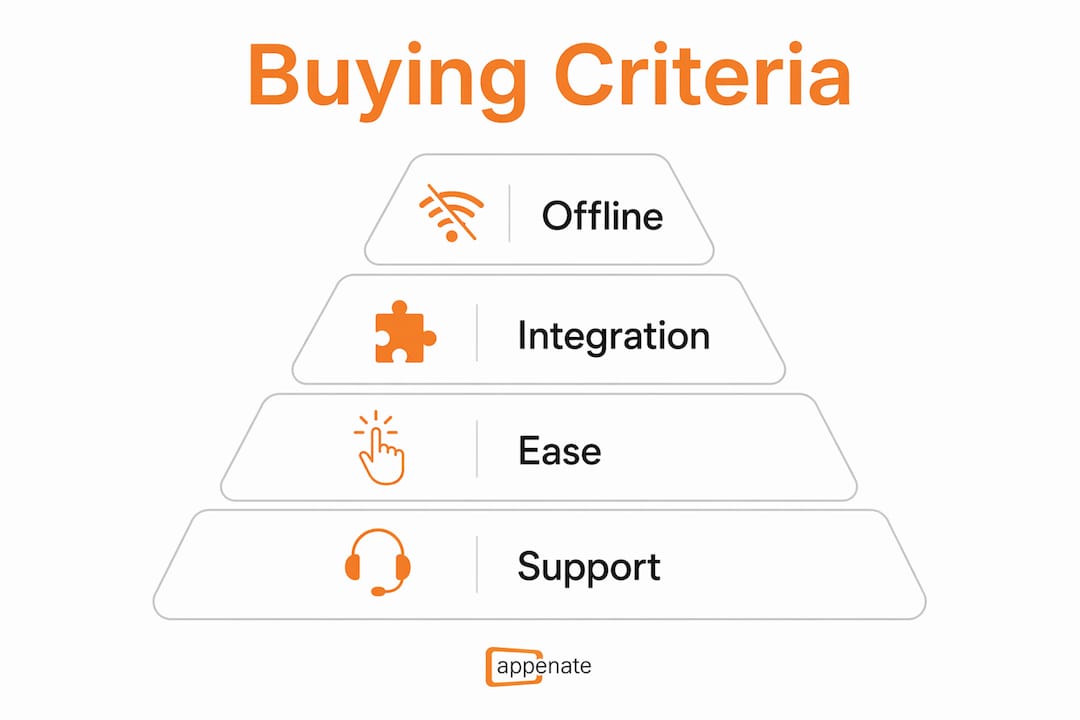
The biggest mistake buyers make is treating this as a feature-checklist exercise. The real question is: which tool category does your operation actually need? Confusing an online survey builder with a field-service automation platform is the most common source of regret in this category. A tool that looks capable in a demo can fall apart the moment a field crew loses signal.
Decision criteria to prioritize:
- Native offline-first architecture — does the app cache data locally and sync on reconnect, or does it require a connection to save?
- Device feature depth — camera, GPS, NFC, barcode, and e-signature support built into the native app, not patched in via a web view
- Workflow orchestration — conditional logic, multi-step approvals, and role-based routing beyond basic form submission
- Integration depth — native Salesforce and Power BI connectors vs. Zapier-only paths (the latter adds latency and a single point of failure)
- Data ownership and export formats — can you pull your data in open formats (CSV, PDF, XML) at any time without vendor assistance?
- Security and compliance — SOC2 and HIPAA certifications where your industry requires them
- Migration effort — hidden migration costs include legacy workflow mapping, field crew retraining, and integration rebuilds; AI-assisted form generation materially reduces this
30-day pilot checklist:
- Test offline sync in a real low-connectivity environment, not just airplane mode on a desk.
- Capture photos, GPS coordinates, and a signature in a single form submission and verify the data arrives intact.
- Run an API or native integration test against your CRM or BI tool with live data.
- Generate a sample report or PDF output and check it meets your compliance or client-facing standard.
- Assign role-based permissions and confirm field crews see only what they should.
Vendor questions worth asking before you sign:
- What is your uptime SLA, and how do you handle sync conflicts when field devices reconnect?
- Do you provide migration assistance, and is AI-assisted form import included in the plan?
- What data export formats are supported, and can we export everything on request without a support ticket?
- What training and onboarding resources are available, and is there a dedicated implementation contact for enterprise plans?
Pro Tip: Run your pilot on the worst-connectivity site your team visits regularly. If the app handles that, it handles everything else.
Choosing between a quick fix and a long-term engine is the real fork in the road. A no-code platform with enterprise APIs avoids the performance and security gaps that connector-reliant tools introduce at scale. If you’re building for the next three years, that architecture decision matters more than the monthly per-seat price.
For teams exploring low-code field app development, understanding the trade-offs between self-serve configuration and managed implementation is equally worth your time before committing to a vendor.
Why Appenate stands out as a GoFormz replacement for field-service teams
Appenate fits enterprise field-service teams, regulated industries, and organizations that need white-label or reseller options. It’s the platform to choose when you need more than a digital form, you need a full mobile workflow engine that connects to the systems your business already runs.
Where Appenate specifically delivers:
- Fully native apps on iOS, Android, and Windows – the only shortlisted platform with a Windows client, which matters for depot-based crews and mixed-device environments
- AI-assisted instant form generation that converts existing paper forms and legacy templates quickly, cutting migration time
- GPS tagging, photo capture, e-signatures, NFC, and barcode scanning are built into the native app
- Native Salesforce and Power BI integration -bidirectional, not export-only
- White-label and reseller licensing for IT consultants and software vendors building branded field apps
- Over 80,000 users across 100+ countries, with active development and regular platform updates
Field-service teams that have replaced paper reports have achieved significant reductions in administrative work and measurable improvements in data quality.
When to choose Appenate: your team operates in low-connectivity environments, you need Salesforce or Power BI integration without a middleware layer, or you’re managing a migration from a legacy system and want AI-assisted form import to reduce downtime.
When to pilot a lighter-weight tool first: your use case is a single simple form with no offline requirement, no integration need, and a team of fewer than five people. In that scenario, Jotform’s free tier or Smartsheet’s entry plan may be sufficient until your needs grow.
Pro Tip: If you’re switching providers, use Appenate’s migration guidance to map your legacy workflows before your pilot starts – it saves weeks of rework.
Key Takeaways
For field-service teams evaluating mobile form platforms in 2026, native offline capability and enterprise integration depth are the two criteria that separate platforms worth piloting from those that will disappoint in production.
| Point | Details |
|---|---|
| Offline-first is non-negotiable | Native apps that cache locally prevent data loss in low-connectivity field environments. |
| Integration depth beats connector count | Native Salesforce and Power BI sync delivers more value than Zapier-only paths at enterprise scale. |
| Migration costs are hidden | Budget for workflow mapping, retraining, and integration rebuilds; AI-assisted tools materially reduce these costs. |
| Match platform category to use case | Native field platforms, no-code workflow engines, and web survey builders serve different needs, pick the right category first. |
| Appropriate for enterprise field ops | Appenate’s native iOS/Android/Windows apps, AI-assisted form generation, and bidirectional enterprise integrations make it a leading choice for teams migrating from GoFormz. |
Our take on this shortlist
Appenate publishes this comparison, so transparency matters here. Appenate appears in this shortlist because it genuinely fits the buyer profile this article addresses: enterprise field-service teams, regulated industries, and organizations managing complex migrations. We’ve positioned it fairly alongside the other platforms rather than inflating its strengths or understating theirs.
The practical trade-off most buyers face is this: ease of setup, integration depth, or offline reliability. Jotform and Smartsheet win on setup speed. ProntoForms and Appenate win on integration depth and compliance. Appenate and GoCanvas win on migration speed from paper. No single platform wins every dimension, which is why the pilot checklist in the buying guide matters more than any vendor’s feature page.
What we’d push back on in the conventional wisdom is that buyers often overweight price and underweight migration risk. A cheaper platform that takes three months longer to deploy and requires a Zapier workaround for every integration costs more in the end, in IT hours, field crew retraining, and the inevitable data-quality cleanup. The platforms that look expensive upfront often pay back faster when you account for those hidden costs.
Appenate: a full-featured alternative worth trialing
Field teams that have outgrown GoFormz or are looking for a platform built for the long haul will find Appenate worth a serious look. The free trial covers the full feature set, offline sync, GPS and photo capture, workflow automation, and enterprise integrations, so you can run a real pilot against your actual workflows, not a demo environment.
Enterprise plans include migration support and a dedicated implementation contact, which reduces the risk of a drawn-out rollout. If your team operates across iOS, Android, and Windows devices, Appenate is the only platform in this shortlist that covers all three natively. Convert your paper forms to mobile apps in minutes and see how the platform handles your toughest field scenarios. Ready to compare directly? Start your free trial or talk to the team about enterprise pricing and migration assistance.
Sources and further reading
Use these sources to verify ratings, feature claims, and market positioning during your vendor evaluation. Ratings pages are best for social proof; feature directories are best for capability cross-checks; vendor pages are best for current pricing and trial terms.
- Best GoFormz Alternatives 2026 — Capterra — user ratings and verified reviews; last reviewed 2026
- GoFormz Profile and Alternatives — SoftwareAdvice — buyer reviews and migration considerations; last reviewed 2026
- 10 Best GoFormz Alternatives — SoftwareSuggest — feature scoring and pricing summaries; last reviewed 2026
How to use these during evaluation: start with Capterra and G2 for verified user sentiment, then cross-check feature claims against SaaSWorthy or SoftwareSuggest, and use vendor pages for current pricing and trial terms before your pilot begins.
FAQ
What is the best GoFormz alternative for offline field work?
Appenate and TrueContext both run fully native offline apps that cache data locally and sync on reconnect — making them the strongest choices for crews working in low-connectivity environments.
Are there free alternatives to GoFormz?
Jotform offers a free tier with basic form-building and limited offline capability; Smartsheet offers a free trial. Most native mobile-first platforms, including Appenate, offer a free trial rather than a permanent free plan.
Which GoFormz alternatives integrate natively with Salesforce and Power BI?
Appenate and TrueContext both offer native bidirectional integration with Salesforce and Power BI, avoiding the latency and reliability risks of Zapier-only connector paths.
How long does it take to migrate from GoFormz to another platform?
Migration timelines depend on the number of legacy forms, workflow complexity, and the number of integration rebuilds needed. AI-assisted form generation tools, like those in Appenate, can significantly reduce import time, but budget for workflow mapping and field crew retraining regardless of the platform you choose.
Does Appenate support Windows devices in addition to iOS and Android?
Yes, Appenate is the only platform in this shortlist with fully native apps across iOS, Android, and Windows, which is a meaningful advantage for teams running mixed-device environments or depot-based operations.
Recommended
- How To Help Your Field Teams Be More Productive – Appenate
- Best for Mobile Field Inspections: Appenate or FastField Forms?
- Why AI-Powered Mobile Forms Are The New Fieldwork Standard – Appenate
- 6 Best AI Form Builders on the Market