
AI in field service delivers real-time, in-context intelligence to technicians at the point of work, raising first-time-fix rates and cutting admin overhead without requiring a data science team to run it. The core capabilities are NLP-guided repair assistance, predictive maintenance alerts, automated data capture, and dynamic dispatch. For IT and operations leaders, the immediate next step is a scoped pilot using a no-code mobile app platform, not a multi-year enterprise rollout.
Here is what a pilot-ready starting point looks like:
- In-context AI guidance: On-device NLP surfaces repair manuals and step-by-step instructions, so the technician never has to leave the job site.
- Appenate as the no-code layer: With 80,000+ users across 100+ countries and fully native iOS, Android, and Windows apps, Appenate lets teams build AI-assisted mobile forms and workflows without writing code.
- Data readiness first: Before any AI feature goes live, confirm that asset histories are digitized, identifiers are consistent, and field data flows into a single system of record.
How does AI actually help field technicians day to day?
The most practical AI applications in field service are not abstract predictions. They are tools technicians use during a job.
Real-time NLP and knowledge retrieval. When a technician faces an unfamiliar fault code, an NLP-powered assistant queries service manuals, past repair records, and engineering notes to return a ranked, step-by-step fix. Retrieval-augmented generation (RAG) connects current asset behavior to obscure historical records, which is exactly where experienced technicians hold institutional knowledge that new hires lack.
Predictive maintenance. AI models analyze IoT sensor data, historical service records, and usage patterns to flag likely failures before they happen. A compressor running 8% hotter than its baseline for three consecutive days is a dispatch trigger, not a surprise breakdown.
Dispatch and route optimization. Dynamic scheduling matches technician skill sets, parts availability, and live traffic data to assign the right person to the right job. This reduces wasted drive time and avoids the common failure mode of sending a technician who lacks the required part or certification.
Automated data capture. Computer vision identifies parts from photos. Voice-to-text converts spoken notes into structured form fields. Both eliminate the manual transcription step that typically occurs hours later, back at the office, by which time detail is already lost.
AI assistants that provide on-demand mentoring, part identification, and diagnostic suggestions cut callbacks and speed ramp-up for new hires, with vendors reporting faster job completion when technicians use AI-guided workflows and part recognition.
Pro Tip: Build your NLP knowledge base from closed work orders, not just product manuals. Resolved tickets contain the diagnostic reasoning that manuals omit, and that reasoning is what makes in-context guidance genuinely useful.
What ROI should you expect from AI in field operations?
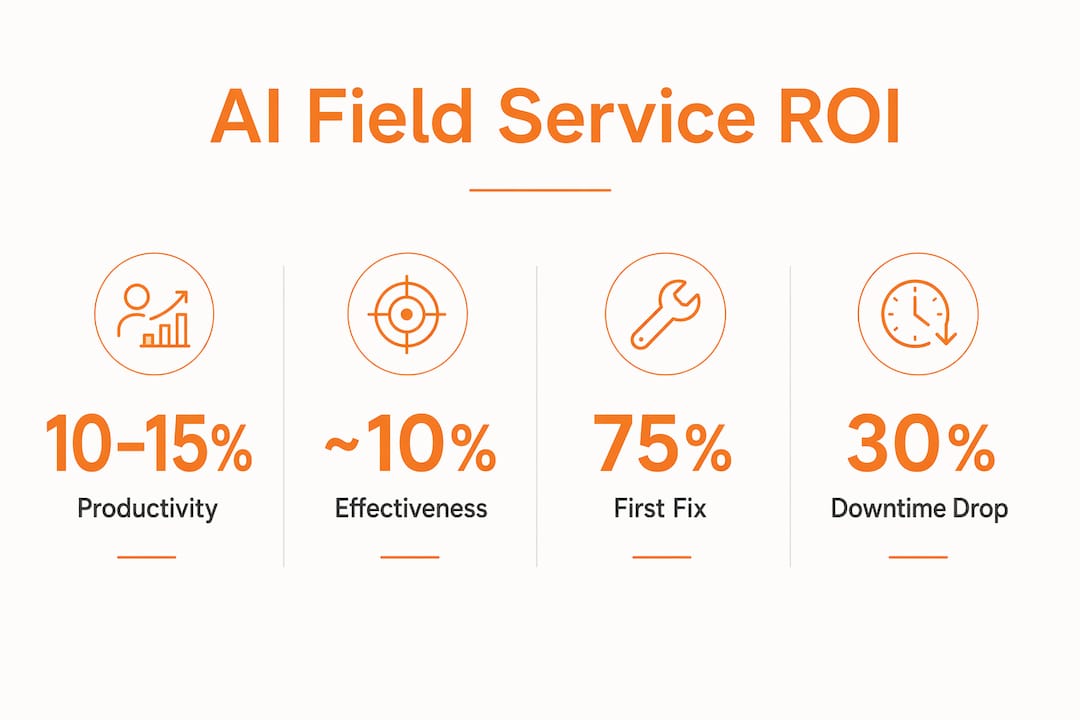
BCG reports 10–15% productivity gains and roughly a 10% improvement in effectiveness for organizations that use field service AI. Translating those percentages into business impact requires mapping them to your own cost structure.
| KPI | What AI Affects | How to Measure During Pilot |
|---|---|---|
| First-time-fix rate | NLP guidance, parts forecasting | % of jobs closed without a return visit |
| Mean time to repair (MTTR) | In-context guidance, agentic dispatch | Average minutes from arrival to job close |
| Admin hours saved | Automated data capture, form auto-fill | Hours/week on paperwork before vs. after |
| Parts carrying cost | Predictive parts intelligence | Stockout frequency, average inventory value |
| Technician utilization | Route optimization | Jobs completed per technician per day |

A simple ROI model for a 20-technician team: if each tech completes five jobs per day at an average value of $300, a 10% productivity gain adds roughly one job per tech every two days. That is approximately $3,000 in additional daily revenue capacity across the team, before accounting for reduced callbacks and parts waste.
To model your own numbers:
- Baseline your current first-time-fix rate, MTTR, and jobs-per-day before the pilot starts.
- Set a minimum acceptable improvement threshold for each KPI (e.g., 8% MTTR reduction).
- Track those three metrics weekly during the pilot and compare to the pre-pilot baseline.
- Calculate the dollar impact using your actual labor cost and average job value.
Why AI fails when your data is broken
The term “trust engineering” describes the prerequisite work that makes AI outputs reliable: unifying asset data, cleaning service histories, and establishing consistent identifiers before any model touches the data. Practitioners recommend building a semantic data layer that connects live IoT feeds, historical work orders, and parts records before deploying AI.
Common data problems that kill AI pilots:
- Siloed records: Asset histories split across spreadsheets, legacy FSM systems, and paper logs with no common asset ID.
- Inconsistent identifiers: The same piece of equipment appears under three different naming conventions across systems.
- Missing sensor mappings: IoT data arrives without linkage to the specific asset or location it describes.
- Stale baselines: Maintenance records that haven’t been updated in 12+ months make predictive models unreliable from day one.
On the security and governance side, U.S. field operations need audit trails for every AI-assisted decision, especially in safety-sensitive environments where OSHA recordkeeping requirements apply. Explainable AI (XAI) features let supervisors see why a recommendation was made, which matters for both compliance and technician trust. Human-in-the-loop (HITL) checkpoints prevent fully automated decisions in high-stakes scenarios.
Statistic: BCG’s field service research identifies data unification as the single most common blocker to AI deployment, ahead of model quality or integration complexity.
Pro Tip: Run a data readiness check before signing any AI platform contract. Confirm: (1) asset records have a unique ID in at least one system, (2) the last 12 months of work orders are digitized, and (3) at least one data source updates in near real time. If any of these are missing, fix them first.
How do you choose the right no-code AI field service platform?
Analysts recommend platforms that allow custom, no-code app creation rather than forcing workflow changes to fit rigid templates. Here are the criteria that matter most.
Hard requirements:
- True no-code customization (forms, workflows, logic) without developer involvement
- Offline-first, native mobile support on iOS, Android, and Windows
- API-first architecture with pre-built connectors for Salesforce, Power BI, and common ERPs
- Zero-trust security model with data encryption at rest and in transit
- MLOps support for model updates and edge inference
AI capability checks:
- In-context NLP assistance available during a job, not just in a back-office dashboard
- Predictive model support (failure forecasting, parts demand)
- Computer vision for parts identification and inspection documentation
- Agentic workflow support for multi-step orchestration (diagnose, order parts, dispatch)
- Explainability features and audit trail logging
Red flags to watch for:
- Locked form templates with no custom logic
- Unclear data ownership clauses in the contract
- No offline mode or web-only mobile experience
- AI recommendations with no explanation or audit trail
- Per-feature pricing that makes AI capabilities cost-prohibitive at scale
| Evaluation Dimension | Strong Signal | Red Flag |
|---|---|---|
| No-code flexibility | Build any form/workflow without code | Template-only, no custom logic |
| Offline/native mobile | True native iOS/Android/Windows | Web wrapper or online-only |
| Integrations | Salesforce, Power BI, ERP via API | Manual CSV export only |
| AI explainability | Audit trail + XAI features | Black-box recommendations |
| Deployment speed | Live pilot in days, not months | — |
| Data ownership | The customer owns all data | Vendor retains data rights |
What does a realistic implementation roadmap look like?
The correct sequence is: digitize data capture first, unify the data layer second, deploy no-code field apps third, then enable AI features. Skipping steps is the most common reason pilots fail.
| Phase | Timeline | Key Activities | Primary Cost Driver |
|---|---|---|---|
| Prep and data clean-up | Weeks 1–4 | Audit asset records, assign unique IDs, digitize paper logs | Internal IT time |
| Pilot launch | Month 1 | Deploy a no-code mobile app to 5–10 technicians, one asset class | App customization |
| Iterate | Months 2–3 | Refine forms, add AI features, track KPIs weekly | Change management |
| Scale | Months 4–6 | Expand to the full team and additional asset classes | Device management, training |
Go/no-go criteria for moving from pilot to scale:
- First-time-fix rate improved by at least the threshold set in your baseline.
- Data completeness (all required fields captured) was above 90% in the pilot group.
- Technician adoption rate above 80% by the end of month two.
- At least one integration (Salesforce or ERP) is confirmed to be stable in production.
Typical cost drivers beyond licensing: integration effort with legacy FSM systems, offline data caching and device management for field hardware, and change management for technicians who are accustomed to paper or legacy apps. Training time drops significantly when the mobile app is built around the technician’s actual workflow rather than a generic template.
How Appenate puts AI to work for field teams
Appenate’s no-code platform is built for exactly this sequence. Teams use AI-assisted form generation to convert paper checklists into mobile forms in minutes, not weeks. The platform’s AI-powered mobile forms capture photos, GPS coordinates, signatures, and NFC tags natively, with all data available offline and synced automatically when connectivity returns.
Key capabilities relevant to AI field deployments:
- Instant AI form generation: Describe the form you need; Appenate builds the structure automatically.
- Offline-first native apps: Full functionality on iOS, Android, and Windows without a network connection.
- Enterprise integrations: Direct connectors to Salesforce and Power BI keep field data flowing into the systems your analysts already use.
- Workflow automation: Conditional logic, approval routing, and automated notifications reduce the manual coordination that typically follows a field visit.
- White-label and reseller options: IT teams and software vendors can deploy branded versions for their own clients.
With 80,000+ users across 100+ countries, Appenate has proven its ability to deploy at scale across industries from utilities to safety inspections. A typical pilot scenario: a 10-technician team digitizes one inspection workflow in week one, adds photo capture and GPS tagging in week two, and connects the data feed to Power BI by end of month one. By month two, supervisors are reviewing live dashboards instead of chasing paper forms.
The most practical value of AI in field service is in-context intelligence that helps technicians solve ambiguous problems by connecting current asset behavior to obscure service records; not just prediction.
Pro Tip: Start your Appenate pilot with one high-frequency form (daily inspection, job completion report) rather than your most complex workflow. Quick wins build technician confidence and generate the clean data your AI features need to perform.
How does AI integrate with existing field service management systems?
Most field service teams already run a FSM platform, a CRM, and some form of ERP. AI does not replace these systems. It sits on top of them, pulling data in and pushing enriched outputs back.
The integration pattern that works: the mobile app (Appenate, in this case) captures structured field data with photos, GPS, and signatures, then pushes that data to Salesforce for CRM-side visibility and to Power BI for operational reporting. Predictive models consume historical work order data from the FSM and return alerts or dispatch recommendations to the technician’s mobile app. The key architectural requirement is an API-first design on both sides, so data flows without manual intervention.
For teams running legacy FSM systems without modern APIs, a middleware layer (such as MuleSoft, Azure Integration Services, or similar) bridges the gap. The no-code mobile app layer handles the field-facing UX while the integration layer handles data routing. This separation keeps the technician experience clean and lets IT manage integrations independently of the app itself.
Key Takeaways
AI in field service delivers measurable gains only when data is clean, the mobile experience works offline, and AI features are layered on top of a digitized workflow, not dropped onto a broken one.
| Point | Details |
|---|---|
| Data readiness is non-negotiable | Unify asset records and digitize work orders before enabling any AI feature. |
| BCG’s productivity benchmark | Organizations using field service AI report 10–15% productivity gains and ~10% improvements in effectiveness. |
| Offline-native mobile is a hard requirement | AI guidance is useless if the app fails without a signal; native iOS/Android/Windows support is mandatory. |
| Pilot scope matters | Start with one asset class, 5–10 technicians, and three KPIs; expand only after hitting go/no-go thresholds. |
| Appenate as the no-code pilot layer | Appenate’s AI-assisted forms, offline-first native apps, and Salesforce/Power BI integrations serve 80,000+ users and support a pilot-to-scale path without custom development. |
What most vendors and IT teams get wrong about AI in field service
The conventional wisdom says AI’s primary value is prediction: forecast failures and prevent downtime. That framing leads IT teams to invest heavily in predictive models before addressing the underlying data and UX problems that slow field work in the first place.
We think the sequence is backward. The technician standing in front of a malfunctioning asset at 2 PM does not need a prediction. The failure already happened. What they need is fast access to the right repair procedure, the right part number, and a clear record of what was done. That is in-context intelligence, and it is available today with a well-built no-code mobile app, even before you add a single predictive model.
The teams we see succeed start by digitizing data capture with a mobile workforce management approach, cleaning up their asset records, and getting technicians comfortable with a mobile-first workflow. AI features are then layered on top of a foundation that actually works. The teams that struggle start with the AI and discover six months in that their training data is a mess of spreadsheets and tribal knowledge.
No-code platforms matter here because they let the operations team own the workflow design. When a form needs a new field or a routing rule needs to change, the operations manager makes the change, not a developer on a two-week sprint cycle. That iteration speed is what keeps the AI useful as the business evolves.
Ready to run a faster AI pilot with Appenate?
Skipping a six-month implementation is possible when the mobile app layer is no-code, and the integrations are pre-built. Appenate gives field service teams a faster path from paper-based chaos to AI-assisted workflows: build your first mobile form in minutes, connect it to Salesforce or Power BI without custom development, and run a live pilot with real technicians in days. Sign up for a free trial today.
The pilot package is straightforward: pick one high-frequency workflow, digitize it with Appenate’s AI form builder, add offline capture for photos, GPS, and signatures, and measure the KPI impact over 15 days. No contract required to start.
Convert your first paper form to mobile and see how quickly our AI Features can move from concept to field-ready.